The "Applicability Screener" tool includes the "Topics Filtering" and "Applicability Questions Filtering" Pages. It helps you to filter the relevant regulatory topics for your facility. The following article introduces how to work on it and what will be the effects.
Topics Filtering Page: User Actions and Effects
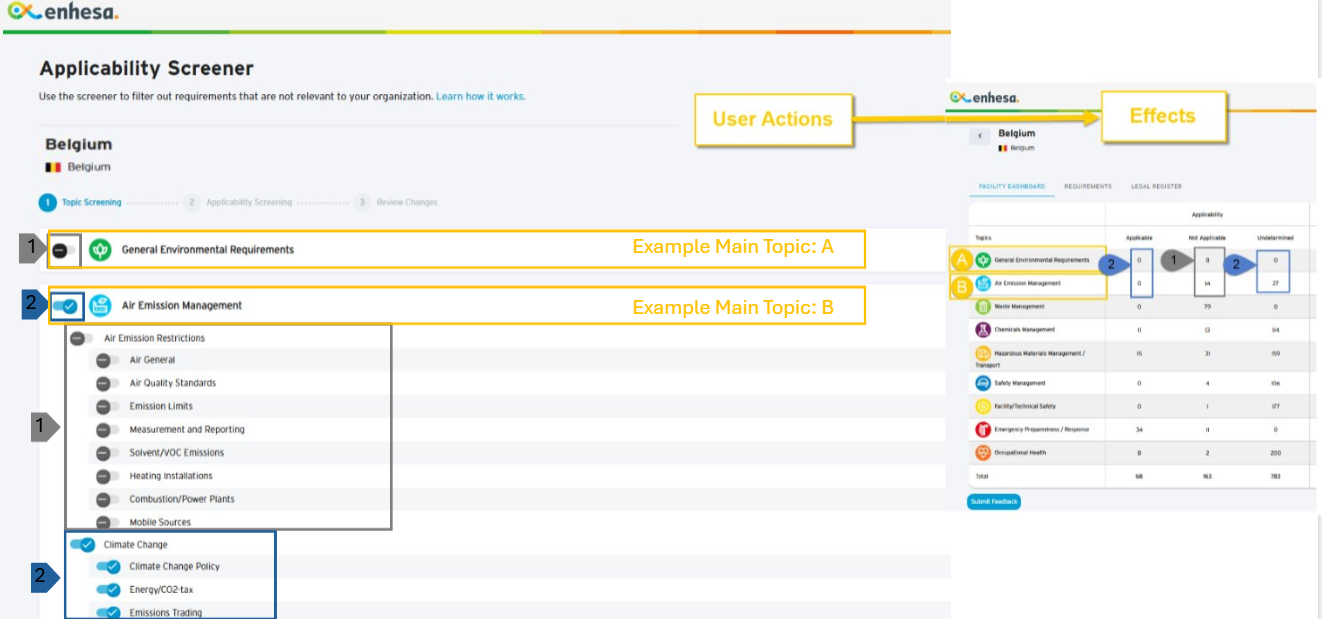
Legend |
User Actions |
Effects |
| [1] Turn OFF the main-topics & sub-topics (example [A]+[B]) which are not relevant to your facility | [1] Regulatory requirements under these topics (example [A]+[B]) are moved to "Not Applicable" | |
| [2] Turn ON the main-topics & sub-topics (example [B]) which are relevant to your facility | [2] Regulatory requirements under these topics (example [B]) are kept either as "Undetermined" or as "Applicable" (if your facility has previously assessed the requirements as "Applicable") |
"Applicability Questions" Filtering Page: User Actions and Effects
Legend |
User Actions |
Effects |
| [3] Answer "No" to the questions (related to example topics [B]+[C]) which are not relevant to your facility | [3] Regulatory requirements associated with these questions (related to example topics [B]+[C]) are moved to "Not Applicable" | |
| 4] Answer "Yes" to the questions (related to example topics [D]+[E]) which are relevant to your facility | [4] Regulatory requirements associated with these questions (related to example topics [D]+[E]) are moved to "Applicable" | |
| [5] Answer "Undetermined" to the questions (related to example topic [E]) which you're not sure whether they are relevant to your facility | [5] Regulatory requirements associated with these questions (related to example topic [E]) remained as "Undetermined", waiting for your further assessment |
If you need further support, please contact Enhesa support team services@enhesa.com.